


Art for Clinicians

Learn how clinicians in the Epic community use Art to more quickly learn about their patients, complete documentation, and wrap up visits.
Message Drafting
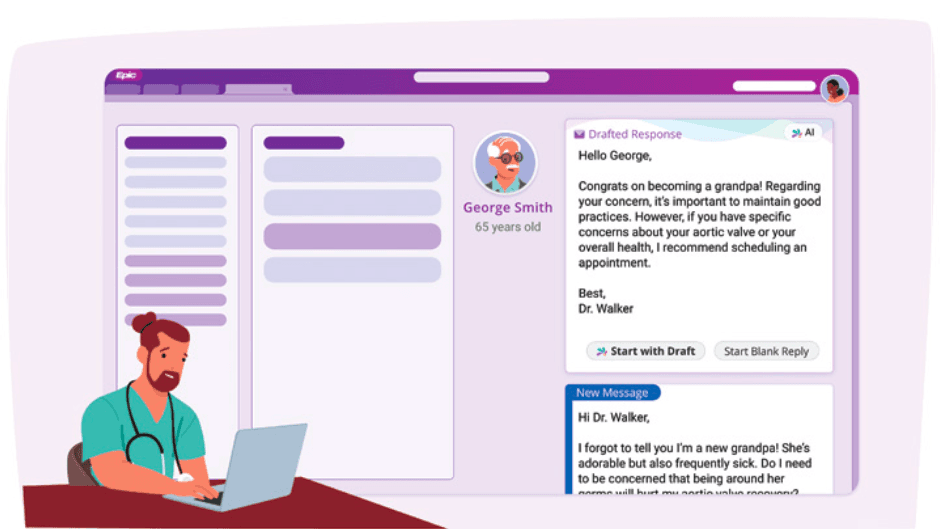
Clinicians can respond to patient messages faster while maintaining personalized, high-quality care with automatically drafted potential responses.
Message Drafting
details →
Draft Outpatient Notes, Orders, and Diagnoses
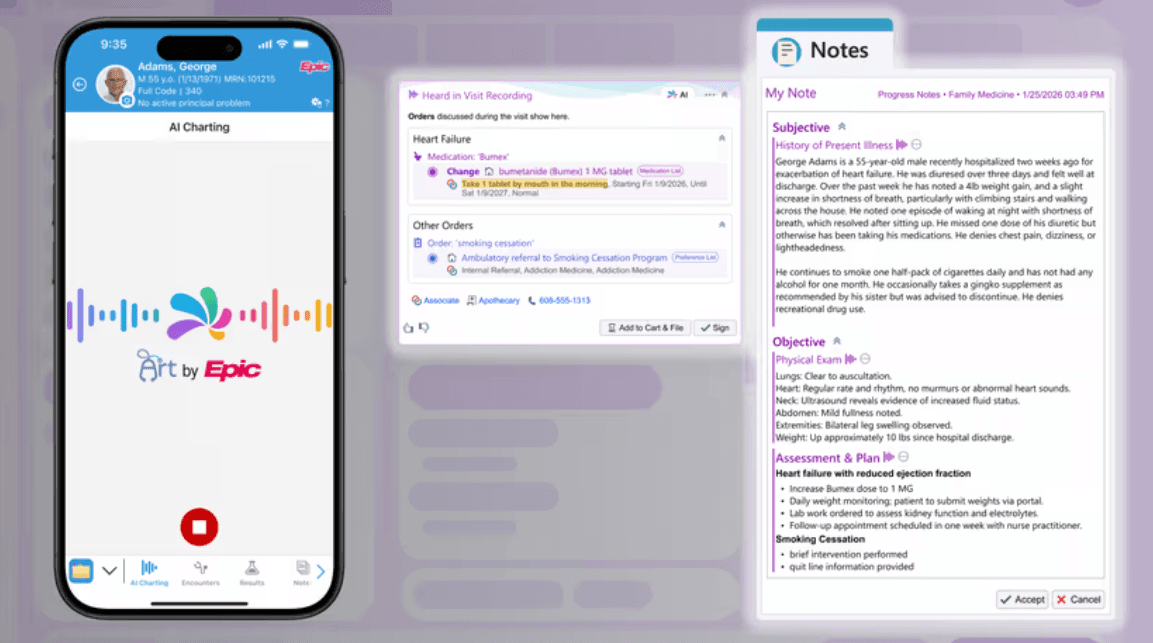
Art captures conversation during a visit, extracts orders and diagnoses, and drafts the visit note to save clinicians time.
Draft Outpatient Notes, Orders, and Diagnoses
details →
Inpatient and Outpatient Insights
Clinicians can reduce the need for manual chart review by reviewing concise summaries of a patient’s history, recent developments, and notes, allowing them to quickly get up to speed on admitted patients.
Inpatient and Outpatient Insights
details →
Draft Care Plan Notes
Reduce the documentation load for nurses using generative AI to draft an end-of-shift note using data already available in the patient's chart.
Draft Care Plan Notes
details →
Text Editing
Clinicians can use AI-powered tools to adjust text they wrote to easily fit their vocabulary or tone to a particular reader, like a patient or a colleague.
Text Editing
details →
Cancer Staging
Collect cancer staging details from notes to help improve cancer reporting, registry data submission, and clinical decision support.
Cancer Staging
details →
Identify Follow-Ups from Imaging Reports
Ensure patients receive any necessary care with help from AI to extract key clinical findings from radiology reports for coordinators or PCPs to follow up on.
Identify Follow-Ups from Imaging Reports
details →
Draft Hospital Course Notes
Reduce physicians' documentation load by using generative AI to draft a hospital course note using data like admission diagnoses, lab results, and vital sign trends, which are already available in the chart.
Draft Hospital Course Notes
details →
Patient Message Insights
Clinicians can review a summary of medications, problems, results, and other details as they respond to messages so that they have relevant patient information at their fingertips.
Patient Message Insights
details →
Draft Notes & Queue Orders in Inpatient & ED
Art saves inpatient and ED clinicians time by transcribing conversations between the clinician and patient during care, understanding the plan, and then drafting the note for the clinician to review and sign.
Draft Notes & Queue Orders in Inpatient & ED
details →
Complete Assessments Hands-Free
Field clinicians can spend more time face-to-face with patients and cut down on wrap-up time by recording visits with Art, which suggests documentation for OASIS assessments.
Complete Assessments Hands-Free
details →
Medication Insights
Help clinicians understand the story behind a patient's medications so they can make more informed and timely treatment decisions with relevant excerpts from clinical notes.
Medication Insights
details →
Risk Adjustment Coding Assistant
CDI specialists have a starting point for their review with an AI-generated summary of the evidence of a diagnosis from past notes.
Risk Adjustment Coding Assistant
details →
Understand Anesthesia Risks Before Surgery
Anesthesia providers can quickly understand a patient's risks and areas of concerns with a summary of data from the chart, like procedural notes, medication notes, and cardiology information.
Understand Anesthesia Risks Before Surgery
details →
Diagnosis Code Suggestions
AI suggests diagnosis codes based on documented findings, helping providers efficiently capture codes with minimal workflow disruption.
Diagnosis Code Suggestions
details →
Level of Service Suggestions
Clinicians can select an appropriate level of service, quickly wrap up their visits, and be compensated accurately with help from AI.
Level of Service Suggestions
details →
Manage Transitions of Care
Care managers can review an AI-generated summary of the patient’s most recent admission to get up to speed on a new case.
Manage Transitions of Care
details →
Extract Pathology Case Data
Pathologists dictate or type their narrative results as usual, and AI extracts the relevant data to complete structured reports, saving them time and duplicate work.
Extract Pathology Case Data
details →
Generate Procedure Note Narratives
Cardiologists can review and edit AI-generated text drawing from intraprocedural information for invasive studies, giving them a head start on their documentation and saving them time.
Generate Procedure Note Narratives
details →
Draft Patient Instructions from Notes
Patients receive clear guidance without clinicians writing instructions from scratch when AI creates a first draft of patient instructions based on the assessment and plan clinicians document in their notes.
Draft Patient Instructions from Notes
details →
Extract Medication Information
Clinical staff don’t need to reconcile as many medications manually when AI helps determine discrete dose, route, and frequency for medications that come from outside organizations.
Extract Medication Information
details →
Quickly Understand Patient Referrals
Consulting specialists see AI-generated summaries of chart information potentially relevant to the patient's diagnosis so they spend less time investigating the reason for the referral and completing the consult.
Quickly Understand Patient Referrals
details →
Extract Social Drivers of Health
AI identifies potential concerns like housing instability, food insecurity, transportation barriers, and financial strain in visit notes and reminds clinicians to complete screenings so patients can receive assistance.
Extract Social Drivers of Health
details →
Draft Therapy Progress Notes
Physical therapists, occupational therapists, and speech-language pathologists can use AI to generate draft assessments for their progress notes, automatically including relevant patient information from evaluation and visit notes, flowsheets, and care plans.
Draft Therapy Progress Notes
details →
Summarize Patient Problems for ED Providers
ED providers can use an AI-generated summary of a patient's medical problems to quickly review the patient's history and kickstart deeper investigation.
Summarize Patient Problems for ED Providers
details →
Transplant Evaluation Insights
Transplant coordinators and committee review members can use AI-generated insights to quickly review a concise summary of a transplant candidate’s clinical notes to prepare for committee review meetings.
Transplant Evaluation Insights
details →
Follow-Ups for Cardiac Patients
AI helps immediately flag candidates for procedures, notifies the referring provider, and prompts timely follow-up so patients get earlier access to life-saving care.
Follow-Ups for Cardiac Patients
details →
Identify Care Gaps
To save clinicians time reviewing test results and transcribing follow-ups, AI identifies recommendations in result text and converts them into discrete follow-ups, so the system can provide accurate guidance.
Identify Care Gaps
details →
Assign Available Nurses
Charge nurses save time by automatically generating patient assignment suggestions that account for patient workload, nurse-to-patient ratios, continuity of care, nurse skills, and more.
Assign Available Nurses
details →
Discharge Planning
AI extracts discharge planning details from clinician notes to summarize next steps, optimizing resource usage and reducing patient flow bottlenecks.
Discharge Planning
details →
Prepare Nephrologists for Dialysis Patient Rounding
Nephrologists save time with AI-generated summaries that include details from recent treatments—such as vitals, flowsheets, and nursing notes—to provide a high-level summary of how a patient has been responding.
Prepare Nephrologists for Dialysis Patient Rounding
details →
Help Triage Patients Prior to Surgery in Pre-Anesthesia Testing
Help clinicians assess surgical risk for an upcoming procedure with AI-generated summaries of medical conditions, surgical history, and other details relevant to pre-anesthesia testing.
Help Triage Patients Prior to Surgery in Pre-Anesthesia Testing
details →
Populate Referral Forms from Scanned Orders
Save referrals staff time by using AI to automatically parse faxed referrals and fill out discrete referral information like referring provider, service requested, diagnosis, and clinical urgency.
Populate Referral Forms from Scanned Orders
details →
Find Answers Quickly with Ask Art
Clinicians can ask Art questions about a patient using natural language and receive concise, cited answers—plus visualizations—without hunting through the chart.
Find Answers Quickly with Ask Art
details →
Translated Patient Messages
Automatically translate incoming patient messages from Spanish to English and show a translated preview to clinicians that they can use to quickly check whether the message requires urgent action.
Translated Patient Messages
details →

The Mayo Clinic is committed to transforming nursing practice and reducing nurse burnout. One of the ways we are doing this is by looking for areas of nursing practice that can leverage automation, including technology and generative artificial intelligence. The implementation of Art has been a good example of this in the ambulatory care setting. By leveraging our tools and technology to generate the message, nurses have more time for critical thinking and hands on work.


Read the full article on EpicShare

—Cheristi Cognetta-Rieke, enterprise leader for the Department of Nursing Practice Transformation at Mayo Clinic
AI Charting for Nursing in the Epic Community
70%
flowsheet documentation captured without entry
$31K
saved over 6 months
Read the full article on Epic.com
Nurses Write Notes 85% Faster with Epic AI
By drafting end-of-shift notes, Art—Epic’s AI for clinicians—is reducing clinician workload, and supporting smoother transitions of care.
Read the full article on Epic.com →
Read the article on Epic.com
Epic AI Charting Rolls Out Alongside an Expanding Set of Built-in AI Capabilities
AI continues to transform the care experience, helping clinicians, patients, and health systems do more.
Read the article on Epic.com →
Watch the video at Epic.com
Cool Stuff Now: AI Charting
AI Charting in Epic helps reduce time spent on documentation, administrative work, and chart navigation—so you can focus more on patient care.
Watch the video at Epic.com →
Read the full article on EpicShare
A Smarter Way to Chart: How AI Charting Is Reshaping the Clinician and Patient Experience
John Muir Health and University of Pittsburgh Medical Center were early adopters of AI charting with ambient listening technology. John Muir Health found that clinicians who use it save 34 minutes per day on notes, and physician turnover dropped by 44%. At UPMC, clinicians reduced “pajama time” by nearly two hours each day.
Read the full article on EpicShare →
Read the full story on EpicShare
Gen AI Saves Nurses Time by Drafting Responses to Patient Messages
Mayo Clinic uses generative AI to draft responses to patient messages. Initial pilots showed that it saves nurses around 30 seconds per message and drafts more empathetic responses. Mayo Clinic plans to expand access to all LPNs and RNs by mid-2024, which could save 1,500 hours per month.
Read the full story on EpicShare →

Can't find what you're after? Contact us

Resources

These resources require a UserWeb login. If you work at an organization that uses Epic and don't have a login, you can sign up here.

UserWeb Resources

Take a deeper dive into implementation and support documentation, education and training resources, and more on the UserWeb.
Art: AI
for Clinicians  →
Generative AI
Feature Library  →

Roadmaps

See a high-level view of what Epic can do now, which new features are coming soon, and what the future holds.
Artificial Intelligence  →
Resources
Our StoryCareersContact UsEpic Community LinkGivingLegalPrivacy & SecurityTrainingEfficiencyVisitingEpic Almanac
Events
UGMXGMEGMAPGMMajlisConnect CollaborationEuropean App ForumsOpen@Epic
Copyright © 2026 Epic Systems Corporation.
  • Software
  • Newsroom
  • Visit EpicShare
  • Visit Epic Research
  • Visit Cosmos
  • Visit MyChart
  • Learn about the technologies available for integration with Epic
  • Visit UserWeb
  • Visit Showroom
  • Visit Epic.com
  • Visit EpicShare
  • Visit Epic Research
  • Visit Cosmos
  • Visit MyChart
  • Learn about the technologies available for integration with Epic
  • Visit UserWeb
  • Visit Showroom
    Software
    About Us
    Our Story
    Visiting
    Epic Health System Community
    Diversity, Equity & Inclusion
    Sustainability
    Contact Us
    Newsroom